Voice-first interface development 01 / 05

Point.Speak.Ship.

Project Voice ready

localhost:3000

Desktop
INDEPENDENT DIGITAL STUDIO

Interfaces that
listen.

We turn a clear product point of view into a precise, expressive interface.

button.primary
VOICE SIGNAL / LIVE
Selected componentbutton.primaryUpdated now
AGENT RUNTIMEApplying spacing and contrast
2 files · +18 −6
VOICE REQUESTMake this interface feel more focused and calm.
Realtime speechLocal codebaseLive previewAgent runtime
THE INTERFACE IS THE PROMPT02 / 05

You already know what feels wrong. Now you can point at it and say what should happen next.

SpokeUI turns visual context and natural speech into grounded source edits. No selector hunting. No translating pixels into tickets.

ONE CONTINUOUS LOOP03 / 05

From intent to interface,
without leaving the preview.

01

Select precisely

Hover the running app and choose the exact component, including tiny icons and nested controls.

02

Speak the outcome

Live transcription captures your request while SpokeUI packages DOM, styles, geometry, console, and network context.

03

Watch source become UI

Your agent runtime edits locally. HMR updates the preview while the agent response stays visible.

Live websitestudio.local
CREATIVE TECHNOLOGY / 2026

Digital spaces
with a pulse.

h1.hero

Independent design and development for products that deserve a point of view.

VOICE SIGNALLIVE
Listening

Intent mapped to h1.hero

COMPONENT01
Hero heading

Visual context attached

LIVE INTERFACEVoice → context → source
Berlin · London · EverywhereScroll to explore ↓
AGENT RUNTIMEUpdating hero typography
HMR · now
CHANGE APPLIEDHierarchy refined2 files · +18 −6
REVIEW THE RESULT04 / 05

Every change earns your approval.

SpokeUI captures the selected component before the agent runs, waits for HMR, then shows the rendered result beside the original.

  • 01 Component before and after
  • 02 Files and line totals
  • 03 Accept or conflict-safe reject
AGENT CHANGE · <hero>Agent runtime
Review required

Clarify the hierarchy, surface live intent, and give the primary action more room.

BEFORE
Arc Studio
WorkAboutMenu
PRODUCT DESIGN

Build faster.

A digital studio for ambitious teams and modern products.

SignalIdle
AFTER
Arc Studio
WorkSystemMenu
VOICE-FIRST WORKFLOW

Shape what you see.

Select a component, speak the change, and review the result live.

Live intentListeningContext linked
3 files changed+42−18
DEBUG WHERE YOU POINT05 / 05

Right-click the problem.
Ask with context.

SpokeUI connects the rendered element to the evidence your agent needs, then keeps its answer over the live preview.
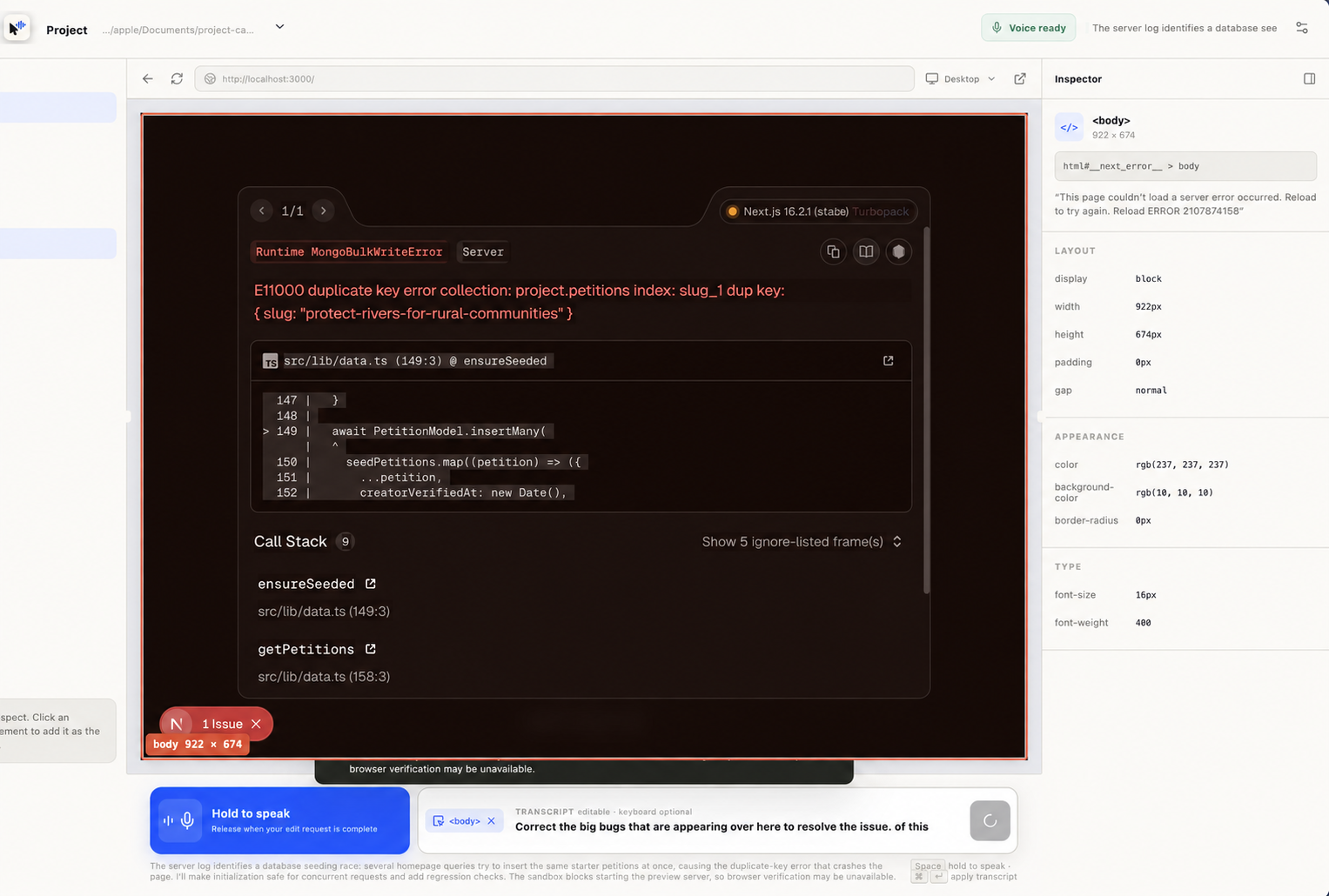
SpokeUI inspecting a selected element in a live preview
ELEMENT ACTIONS
Agent response

The selected component is rendered by src/app/page.tsx. Its failure originates in a duplicate seeding call, not the component layout.

Source + console + network attached

Bring the tools you already use.

01Voice inputLive transcription
02Agent runtimeLocal source edits
03Your codebaseAny web stack
04Live previewRendered feedback

THE VISUAL IDE THAT LISTENS

Stop describing the screen.
Start speaking to it.

Download SpokeUI